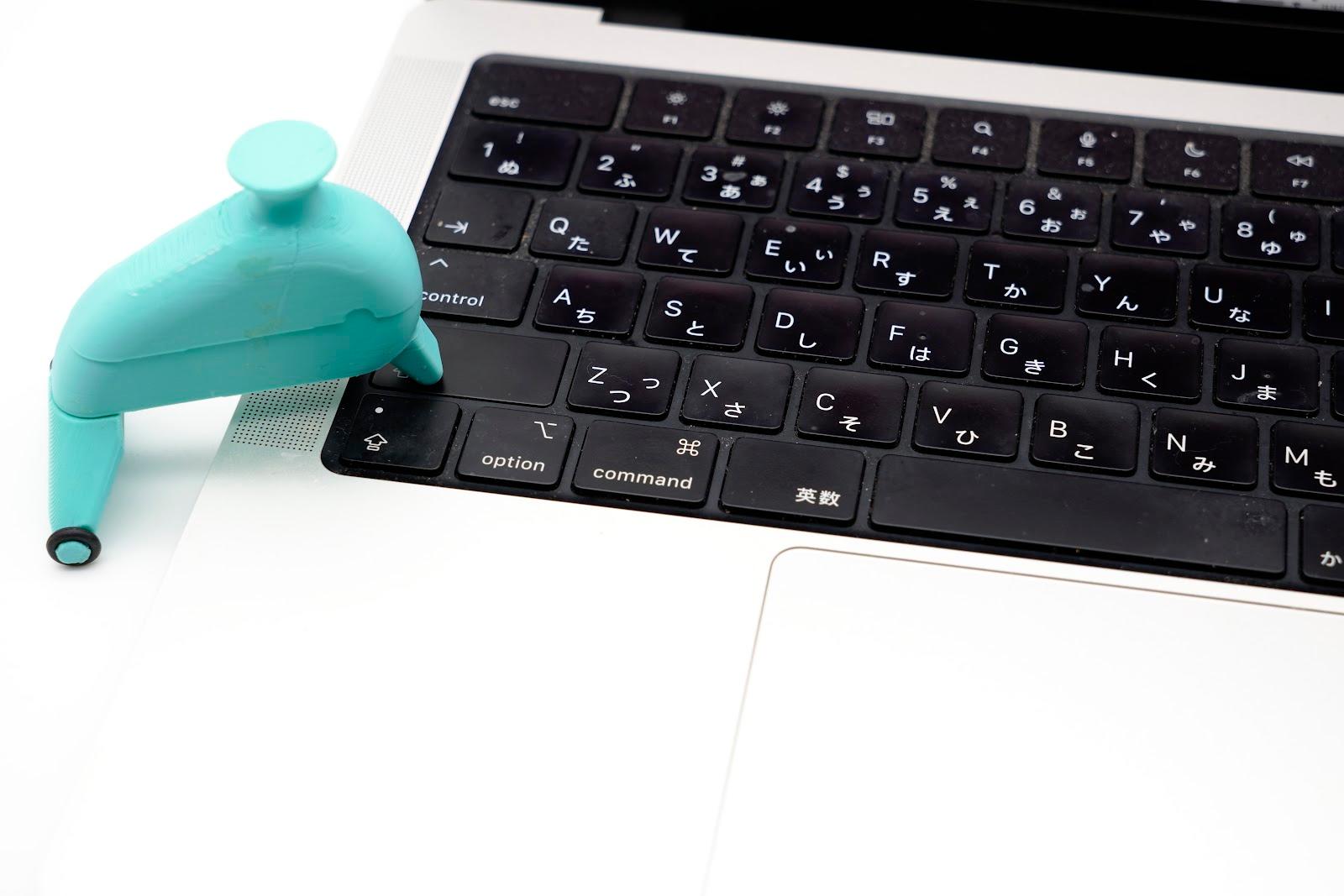
One-Handed PC Input Help - Dolphin - —TA-01
片手でPC入力お手伝い〜イルカちゃん〜—TA-01
- Category
- Communication
- Designer
- TAKUMI21 Masafumi Tamura
- Material
- PLA
- License
- COCRE HUB LICENSE
- Downloads
- 24
About this item
For (With Whom)
People with one hand impaired who want to type on a personal computer (PC) using only one hand.
Why
The need came from several acquaintances with one impaired hand. For key inputs that normally require "simultaneous pressing" with both hands, such as Shift, Ctrl, Alt, and Windows keys, holding a key down can also be done through PC settings, but switching takes effort, so they had been coping by placing fishing sinkers or similar weights on the keys. I made this out of a wish to create something easier to press down, and in the form of a mascot-like tool people can feel attached to.
Printing tips
How
Some acquaintances live far away, so interviews were conducted mainly by phone and email. We learned that they were currently using fishing sinkers and large bolts, and that placing these on keys was unstable and difficult to handle. Based on this, we first made a functional model to solve these problems, and refined it by repeating evaluation, confirmation, and improvement. After that, we designed it in the shape of a dolphin that people would become fond of, without impairing its function. Meanwhile, since commercially available keyboards vary widely in key actuation force, height, and stroke, we trialed it on a variety of keyboards at electronics retailers and further optimized the weight and shape of the sinker. However, we have not confirmed it on every commercially available keyboard, so please be aware of that.
Outcome
- It is easier to handle thanks to the fin on top to pinch and the non-slip step on the side of the belly.
- Because it presses with a small beak, it is easier to place on a key.
- Since non-slip rubber is attached to the tail fin, it is less likely to shift position after being placed on a key.
- Its uses have broadened: besides the PC, it can also be used as a paperweight for taking notes.
Materials Used
Body, tail fin, lid: ABS
Approximate 3D Print Weight
18g
Print Settings Overview
Body: Nozzle diameter=0.4mm, Layer height=0.2mm, Infill=25%, Temp=220°C, Speed=50mm/s, Support=Yes (Everywhere) Tail fin / lid: Nozzle diameter=0.4mm, Layer height=0.2mm, Infill=25%, Temp=220°C, Speed=70mm/s, Support=None
Information on Attached Everyday Items
- Sinker: Daiichi Seiko Bukkomi weight No. 30, 104g; remove the rubber tube. 2. O-ring: 2 fluoro-rubber pieces, outer diameter φ7.6mm, inner diameter φ3.8mm. 3. Magnet: Daiso super-strong mini magnet, 280 millitesla, φ6mm, thickness 3mm. 4. Adhesive (for body and magnet)